Notes are your team’s shared record of working with each creator. Use them to remember who delivers early, who needs keys well before an embargo, or who broke your rules.
This short video shows how to add, read, and filter notes:
Who sees your notes
Section titled “Who sees your notes”Only your team can read the notes you write. Everyone on your team who can open Creators can read notes and add their own. You can edit or delete only the notes you wrote.
Notes stay with the creator across all your programs. In a program’s Creators list, a note written in another program shows that program’s name. A teammate whose access covers only some of your programs sees the notes written in those programs.
Add a note
Section titled “Add a note”-
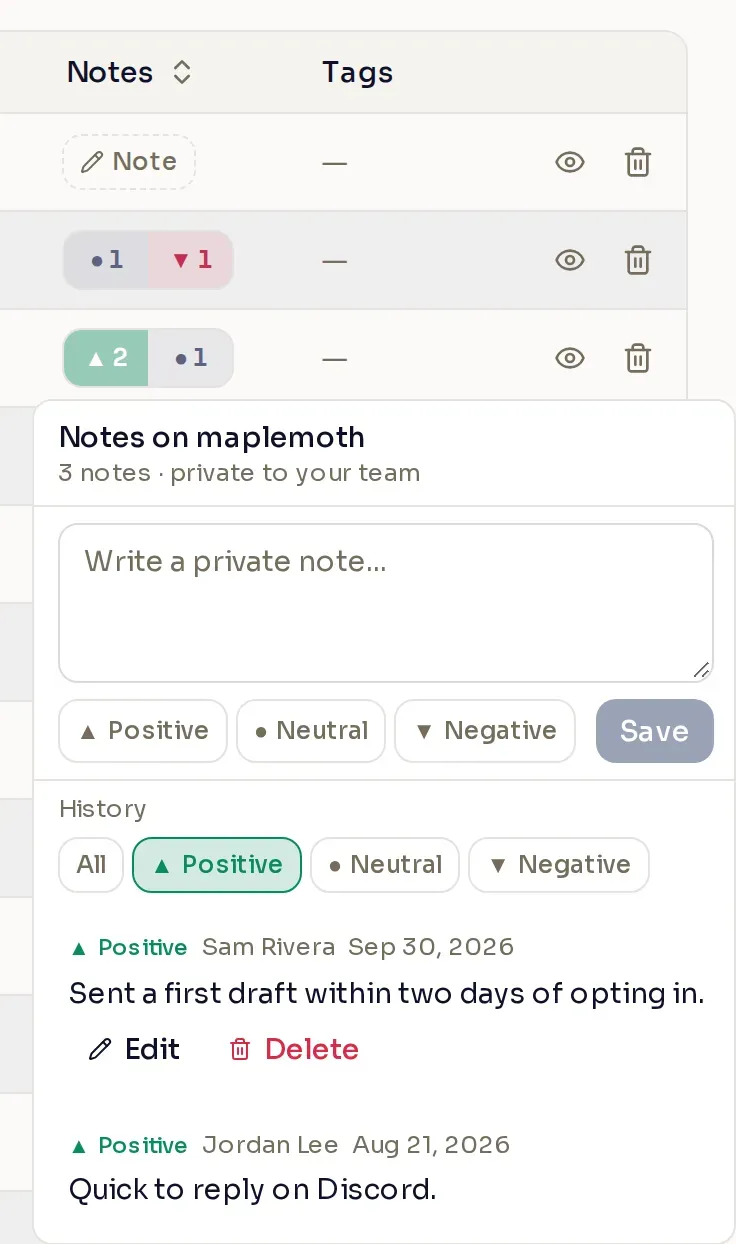
Open the creator’s notes. In Creators, find the creator and select Note in the Notes column. If they already have notes, select one of the counts there instead. The column is on every tab, so you can note applicants and denied or removed creators too.
-
Write the note. A note can be up to 1,000 characters.
-
Choose a sentiment and save. Select Positive, Neutral, or Negative, then select Save.
Read notes
Section titled “Read notes”Each count in the Notes column is how many notes of that sentiment the creator has. Point at a count to preview its newest notes, and select it to open them. Under History, each note shows who wrote it and when, newest first, and All, Positive, Neutral, and Negative filter the list.
To find creators by their notes, use the Notes filter above the list. On a creator’s own page, the same counts sit beside their country and language.
Edit or delete a note
Section titled “Edit or delete a note”On a note you wrote, select Edit, change the text or sentiment, and select Save.
To delete a note, select Delete, then Delete note. You cannot undo it.
Denial and removal reasons
Section titled “Denial and removal reasons”When a creator is denied, or your team removes one, Nexus adds a Denial reason or Removal reason note. These notes can repeat text the creator has already seen, such as the message you sent when you removed them. A denial reason counts as Neutral and a removal reason as Negative. Nobody can edit or delete these notes.
Notes stay with the creator after they leave your program, so if they rejoin, your team’s history is still there.