A Private Referral Program requires a referral code linked to the program. This could be the Support-a-Creator code for one of the group’s members, but this example walks through generating a referral code and linking an existing Nexus account to the program.
Generate a referral code
Section titled “Generate a referral code”To generate a referral code, use the following API route:
/manage/membersHere’s how you call that with curl:
curl -X 'POST' \ 'https://api.nexus.gg/v1/manage/members' \ -H 'accept: application/json' \ -H 'X-SHARED-SECRET: nexus_sk_your_key_here' \ -d '{ "playerId": "abcd-123-efg"}'The only information needed is a playerId, which should be a unique identifier for the user in your system that this code will represent. You will be able to retrieve the code by the playerId, so there is no need to store any information on your side.
The status should be 200 with a JSON response body that looks something like this:
{ "groupId": "CsRKC8uD0NLtyQ0LOt8Ru", "groupName": "Test Group", "playerId": "abcd-123-efg", "code": "8ris29f"}Link your user to an existing Nexus account
Section titled “Link your user to an existing Nexus account”You may also link with an existing Nexus account by having the Nexus owner provide an authentication code that they can generate through the Nexus Dashboard.
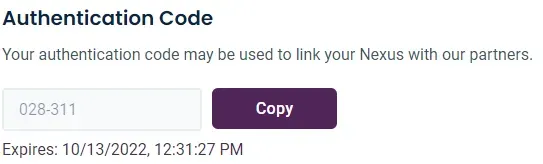
Once you have their authentication code, use this route to link the Nexus account associated with the authentication code to a user:
/manage/members/linkHere’s how you call that with curl:
curl -X 'POST' \ 'https://api.nexus.gg/v1/manage/members/link' \ -H 'accept: application/json' \ -H 'X-SHARED-SECRET: nexus_sk_your_key_here' \ -d '{ "playerId": "abcd-123-efg", "authCode": "028-311"}'Include the authentication code the user provided and, just like when generating a code, a playerId, which should be a unique identifier for the user in your system. In this case as well, you will be able to retrieve the code by the playerId, so there is no need to store any information on your side.
The status should be 200 with a JSON response body that looks something like this:
{ "groupId": "CsRKC8uD0NLtyQ0LOt8Ru", "groupName": "Test Group", "playerId": "abcd-123-efg", "codes": [ { "code": "samzorz", "isPrimary": true, "isGenerated": false, "isManaged": false }, { "code": "8ris29f", "isPrimary": false, "isGenerated": true, "isManaged": false } ]}This example links a Nexus account to the same playerId that you generated a code for in the previous section. As a result, the user now has two referral codes associated with it. The code flagged as isPrimary will be the one associated with the linked Nexus account. The code generated before will be flagged as isGenerated, but it will not be flagged as isManaged because it is now managed by the Nexus account it was linked with.
Create a referral
Section titled “Create a referral”Now that a referral code is associated with the program, create a referral by making an HTTP POST request to the following route, using your private key for authentication:
/Here’s how you call that with curl:
curl -X 'POST' \ 'https://api.nexus.gg/v1/referrals' \ -H 'accept: application/json' \ -H 'X-SHARED-SECRET: nexus_sk_your_key_here' \ -d '{ "code": "8ris29f", "playerId": "dlad04-fr9k", "playerName": "Test Player"}'The status should be 200 with a JSON response body that looks something like this:
{ "groupId": "CsRKC8uD0NLtyQ0LOt8Ru", "groupName": "Test Group", "referral": { "id": "kFpZIMecDEw0M95Kat3Qr", "code": "samzorz", "playerId": "dlad04-fr9k", "playerName": "Test Player", "referralDate": "2022-09-29T21:30:25.400Z" }}Next steps
Section titled “Next steps”You have created a referral in a private referral program. To list, retrieve, or otherwise work with referrals, see managing referrals.